
Chapter 1 · 1.2
Which apps are included in my package?
Every WebOké Nextcloud comes with a fixed set of apps. If you have a package with Office, you get a few extra apps on top of that. This article shows you exactly what you have.
The apps in every personal package (Personal, Family and Max)
| App | What it's for | Read more |
|---|---|---|
| Dashboard | Your home screen with appointments, notifications and messages | Making the Dashboard your own |
| Files | Storing, sharing, restoring versions and recovering deleted files | The Files app: overview and views, Recovering a deleted file from Deleted files |
| Activity | See what's happening with your files and shared folders | Chat and activity for a file |
| Photos and Memories | Organise photos into albums, a timeline and a map, and recognise people and things | Photos or Memories: which app for what? |
| Calendar | Appointments, invitations, shared calendars | Calendar: views, making appointments, repeating and reminders |
| Contacts | Your address book, also on your phone | Contacts: creating, groups, importing and exporting |
| Tasks | Task lists with deadlines | Tasks: lists, deadlines and subtasks |
| Read and send from your existing mailbox within Nextcloud | Adding your mailbox to the Email app | |
| Notes | Quick notes, also on your phone | Creating notes and using them on your phone |
| Deck | Task boards with cards (kanban) | Deck: boards, lists and cards, and using them together |
| Teams | Create groups of people to share with in one go | Creating teams and sharing a folder with your whole team |
| WebOké Import Tool | Transfer your files, photos and calendar from Google | Transferring Google Drive, Photos, Calendar and Contacts with the WebOké Import Tool |
| Data migration | Transfer files from Dropbox or OneDrive | Moving Dropbox across with Data Migration |
There are also some features that you won't see as a separate app, but that are always there: sharing via a public link or by email, a download limit on links, file versions, the recycle bin (Deleted files), end-to-end encryption and logging in with an extra code or an authenticator app.
What you get with Office
If your package has at least one Office Suite licence, you'll also get these apps:
| App | Who it's for | What it's for |
|---|---|---|
| Euro-Office | Users with a licence | Edit documents, spreadsheets, presentations and PDFs in your browser. See the Euro-Office manual. |
| Talk | Everyone in the package | Chat, call, video conference and share your screen (What is Talk and who has it?) |
| Forms | Everyone in the package | Surveys and registration forms (Creating and sharing forms and surveys, and viewing the responses) |
| Collectives | Everyone in the package | A shared knowledge base or manual (Collectives: a shared knowledge base for your team or association) |
| Tables | Users with a licence | Lists and small databases (Tables: lists and small databases without a spreadsheet) |
| Analytics | Users with a licence | Data in charts (Analytics: data in charts) |
Please note: If Office is removed from your package, these apps disappear from the menu. Your data is kept safe. If you switch Office back on later, your conversations, forms and tables will be there again.
How to see which apps you have
At the top of the screen, you'll see the icons for the apps you use most. Click the three dots (1) to see the other apps. Below, you can see the menu for a package with Office: it also includes Talk, Forms and Tables. With a package without Office, these are missing.
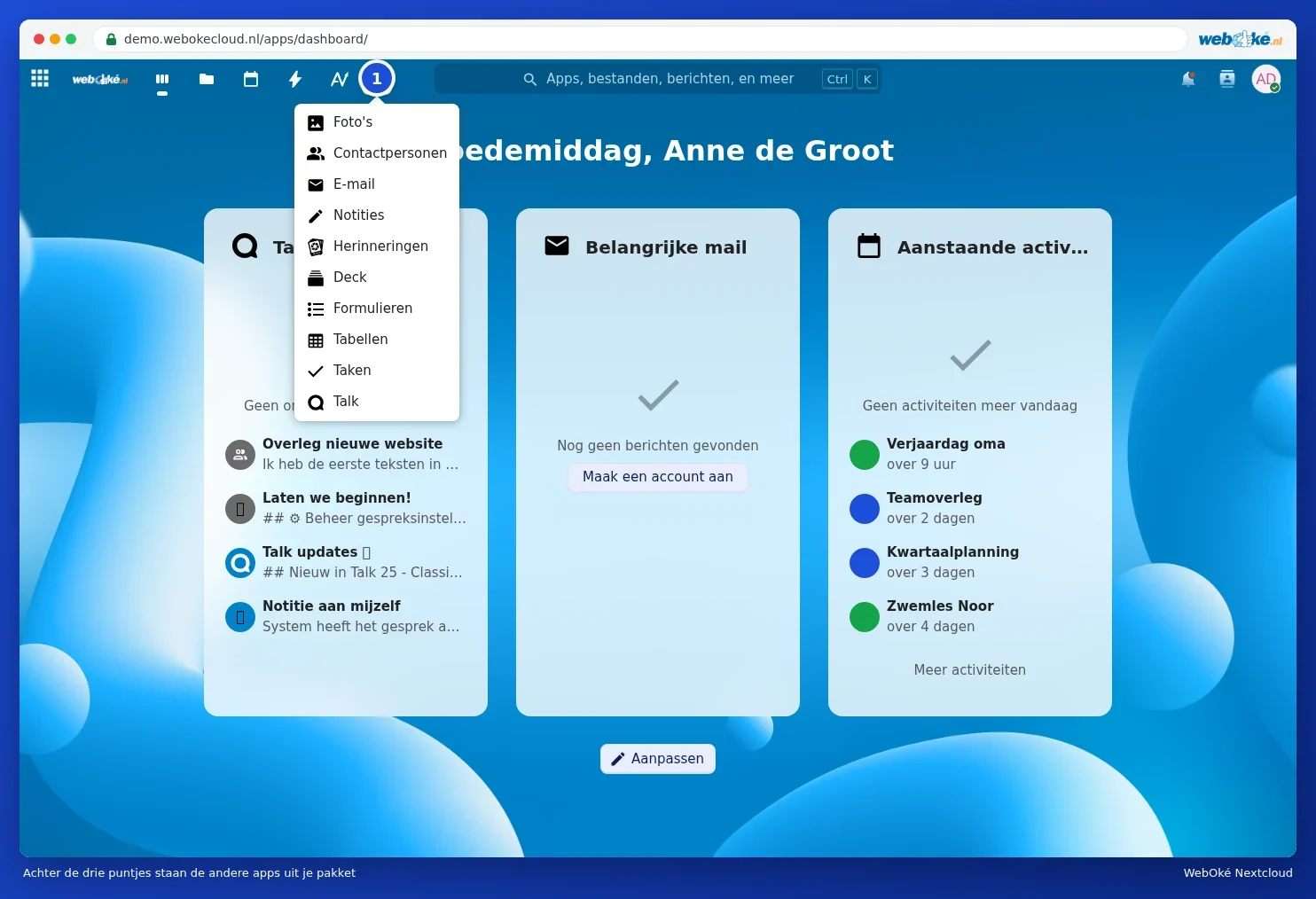
In the top left corner, there's a button with nine small squares. This opens a menu on the left with all your apps listed below each other. You can read more about the parts of the screen in A tour of the screen.
What about Nextcloud Free?
Nextcloud Free is a free 5 GB account on a shared Nextcloud. It includes the basic apps to get to know the service: Files, Photos, Calendar, Contacts, Email, Notes and Tasks. Office, Talk and user management aren't included. If you want more, you can switch to a paid package. See Nextcloud Free, Personal, Family and Max: differences and switching.