
Chapter 10 · 10.5
Your default payment method
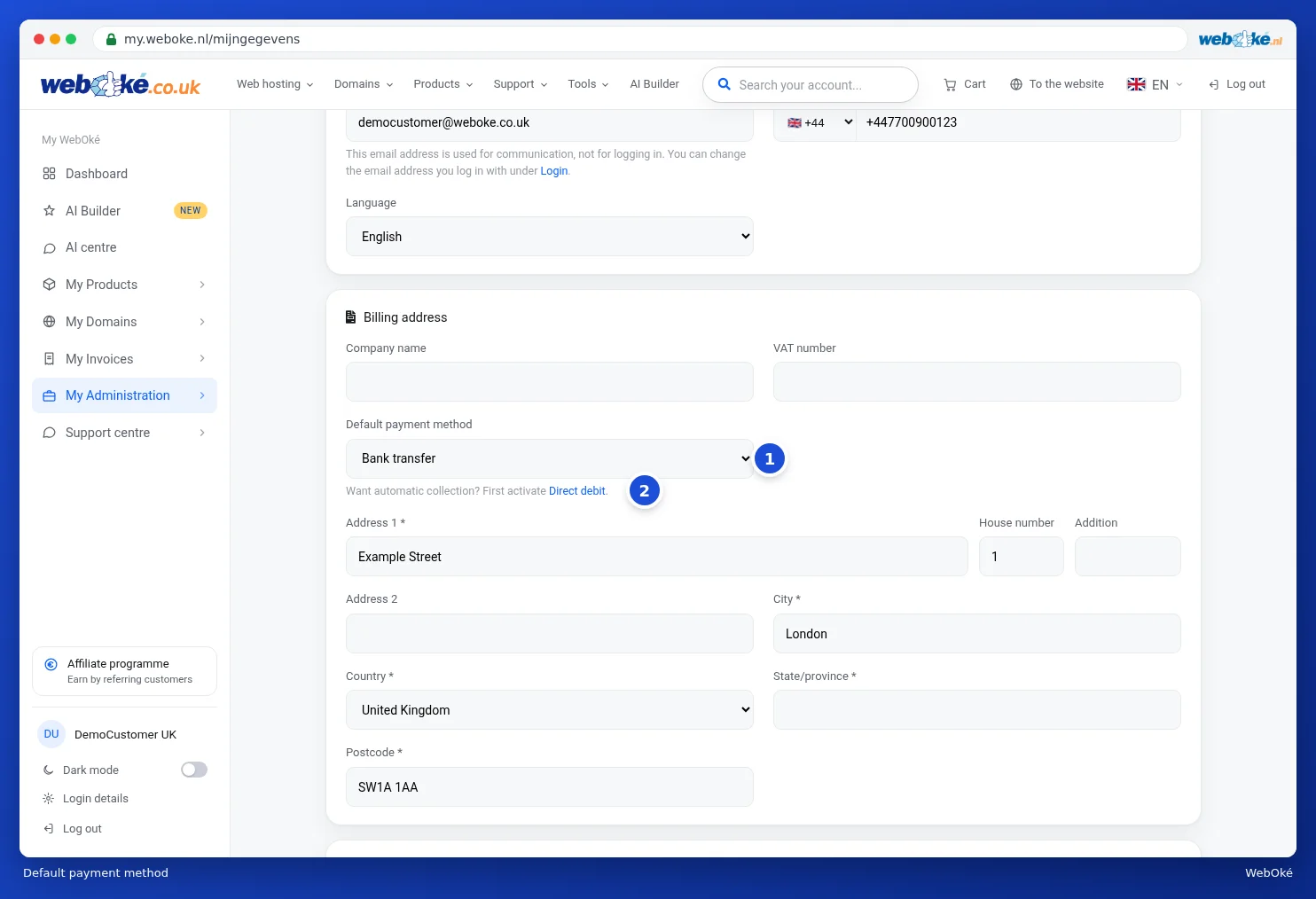
Your default payment method determines how you pay new invoices. You set it up in your details: go to My Administration and select the Details tab. You'll find the Default payment method field in the Billing address block.
The options
| Method | What does it mean? |
|---|---|
| iDeal / online payment | You get a payment link with every invoice and pay online, for example with iDeal or another method on the payment screen. |
| Bank transfer | You transfer the amount yourself to our account number and mention the invoice number. Even then, you can still pay online via the payment link. |
| Direct debit | We automatically collect your invoices. This option only appears once you've activated direct debit. |
How to change it
- Choose the method from the drop-down list (1).
- Scroll down and click Save changes.
Want direct debit? Then don't select it here. Click Direct debit below the field (2) and activate it first. After that, your default payment method will automatically be set to direct debit. See Setting up or stopping direct debit.
Tip: your default payment method is just a preference. On the payment screen, you can still choose a different method for each invoice.